Empathy in action, Design
World Usability Day 2026: who does your product still exclude?

by Serhat Altın ·
It’s World Usability Day: a good moment to ask who your product currently excludes. Often it isn’t the people you think of, but ordinary users in a slightly different situation.
What is World Usability Day?
World Usability Day falls on the second Thursday of November every year. This year that’s 12 November. It’s a day to stop and think about how usable the products we make every day really are, and who they don’t work well for.
1 screen, 5 experiences
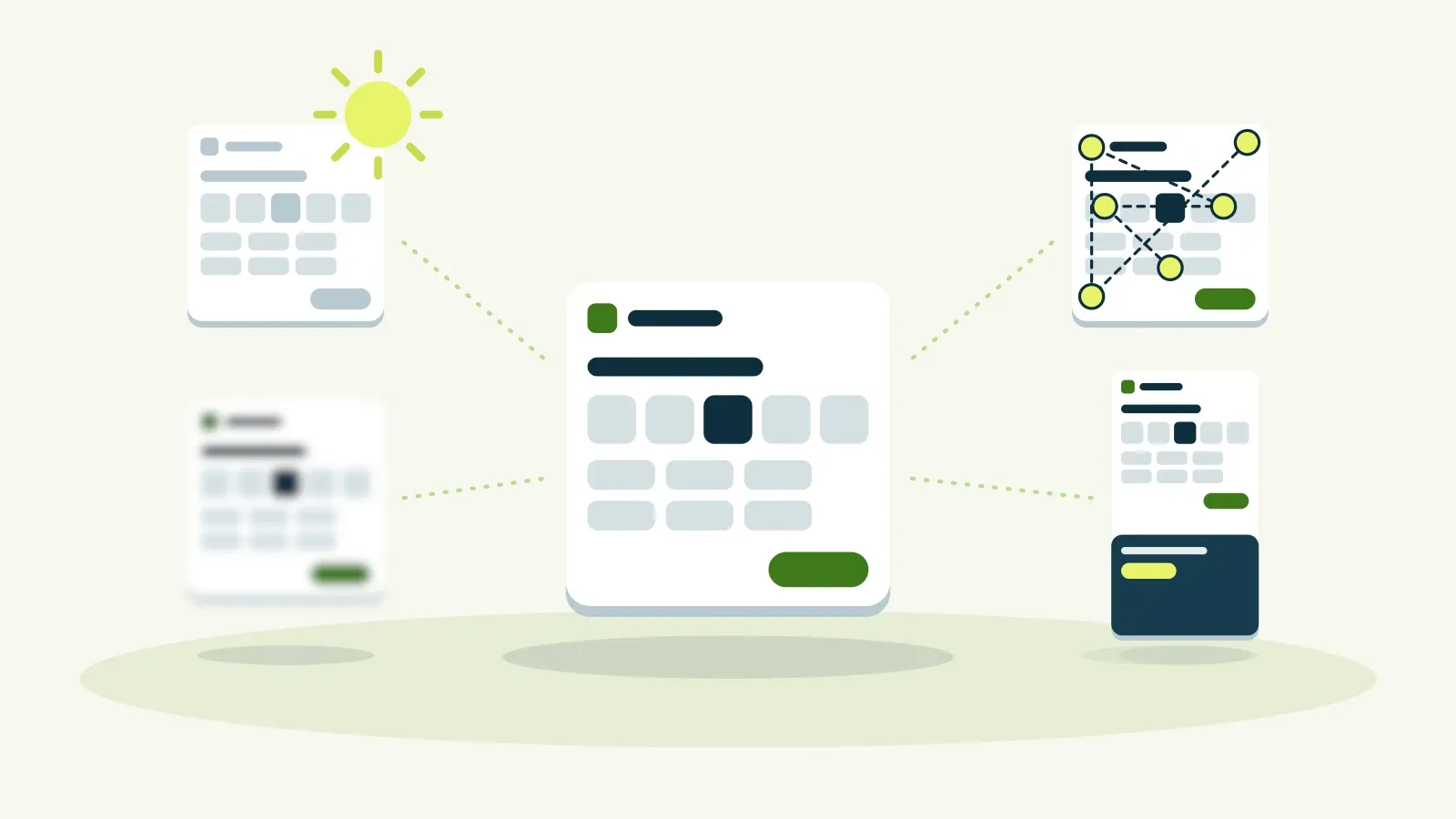
Take a simple screen: booking an appointment at a clinic. You choose a day and a time and click Continue. In the design file it looks calm and tidy. That’s also how most teams test it: on a new device, on fast internet, at a desk.
But the same screen gets used in very different ways. We look at it 4 more times, each time through the eyes of someone the design didn’t take into account.
In sunlight, on a slow connection
Design for the newest device, on fast internet and in good light, and a lot disappears as soon as someone is outdoors. Light grey text and subtle colour differences vanish in the sun. On a slow connection, parts load halfway or in the wrong order. The choices are still there, but you can’t see them any more.
With low vision
Test only with people who look and work like your own team, and you miss the people who see less well. For someone with low vision, the same screen becomes a field of vague blocks. Small text, low contrast and information carried only by colour make it hard to find the right day and time.
With only a keyboard
Treat accessibility as a checklist run at the end, and basic things often don’t work. Someone navigating with a keyboard sees the focus jump all over the screen and never reaches the Continue button. For that user, the screen simply ends there.
On a first visit, on a small phone
Optimise for the user who already knows the way, and you forget the first visit. On a small phone you then see:
- text at a fraction of its normal size, unreadable without zooming;
- half the screen off the edge, including the button to continue;
- day and time buttons too small to tap properly;
- a cookie notice covering everything before you’ve seen anything.
Put the 5 versions side by side and you see the problem: only 1 of them is the experience you tested.
What do you do instead?
Design for the edges, and the middle gets better. A dropped kerb is meant for wheelchairs, but it also helps everyone with a pram or a suitcase. Digital products work the same way.
- Test outdoors. On older phones, in sunlight, on slow connections.
- Recruit outside your bubble. Testers who don’t look or work like your team.
- Build accessibility in. From the first sprint, not as a checklist at the end.
- Watch first-time users. Not just the people who already know the way.
For many organisations this is no longer optional either. Since 28 June 2025 the European Accessibility Act has applied to services such as online shops and banking. The WCAG guidelines are the usual starting point.
🐸 Whoever you don’t test with, you quietly exclude.
Want to know how your website or app does in these 5 situations? With an accessibility scan we see where users get stuck and what to fix first.
In short
- On World Usability Day, ask who your product currently excludes.
- The same screen works differently in sunlight, with low vision, with only a keyboard and on a first visit on a small phone.
- Usually you have tested only 1 of those experiences.
- Design for the edges: test outdoors, recruit more widely, build accessibility in from the start and watch new users.
Also read our accessibility cheat sheet and our article on World Usability Day 2024. You’ll find more about the day itself at worldusabilityday.org.
Frequently asked questions
When is World Usability Day?
World Usability Day falls on the second Thursday of November every year. In 2026 that’s 12 November.
What does designing for the edges mean?
You deliberately design for users in difficult situations: in bright light, with low vision, with only a keyboard or on a first visit. What works for them usually makes the product better for everyone else too.
Is accessibility required for my website?
For many businesses, yes. Since 28 June 2025 the European Accessibility Act has applied to services such as online shops and banking. Whether and how it applies to you depends on your services and the size of your organisation.